Enter AzerothDownload & Play
Gemstone WoW is installed by Syphon Vault, a free Windows launcher. Install the Vault, press Install on GemstoneWoW, then press Play. No archive to unpack, no realmlist to edit.
- 2 MBLauncher setup
- 34.4 GBGame download
- 34.8 GBInstalled size
- 69.2 GBWhile installing
- For Windows 10 & 11
- The launcher needs no admin rights
- Signed by Syphon
- Windows blocked it? Read why
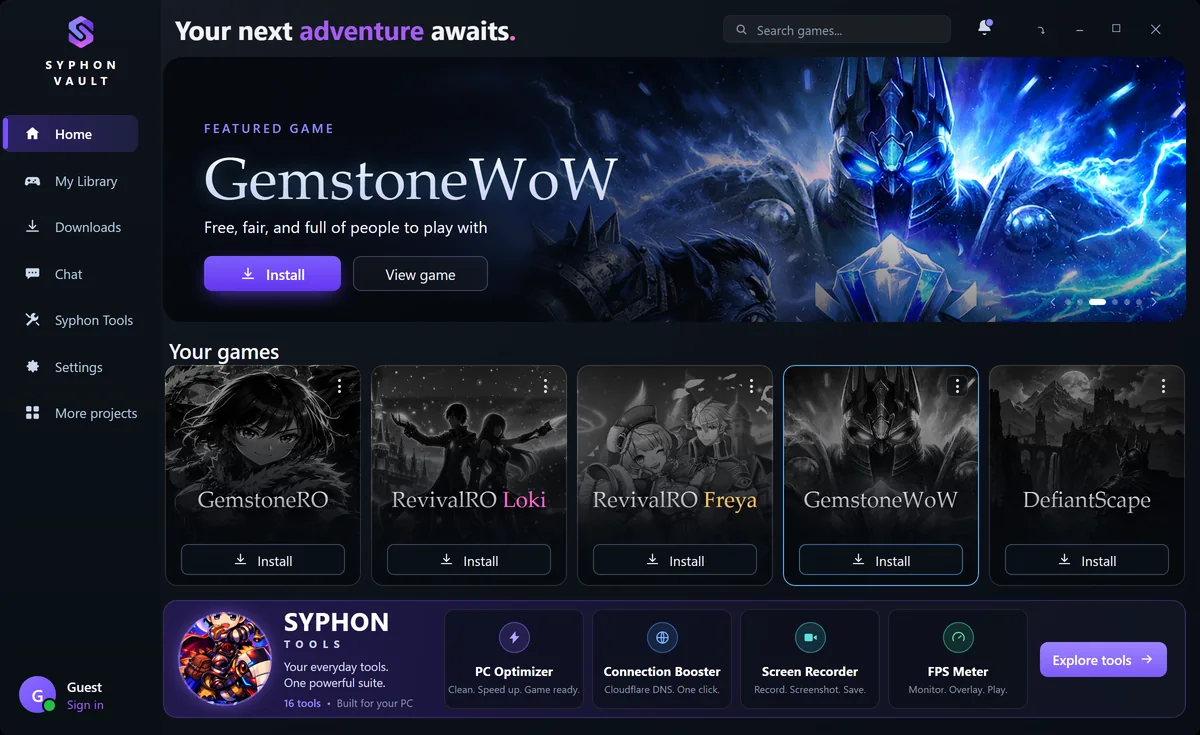
Your Adventure in Three Steps
Install the launcher, install the game, press Play. The Vault does the heavy lifting.
Install Syphon Vault
Download
SyphonVault_WebSetup.exe, about 2 MB, open it and click Install. It gets the newest Syphon Vault and installs it for your Windows user, so it never asks for administrator rights, and it is finished in seconds.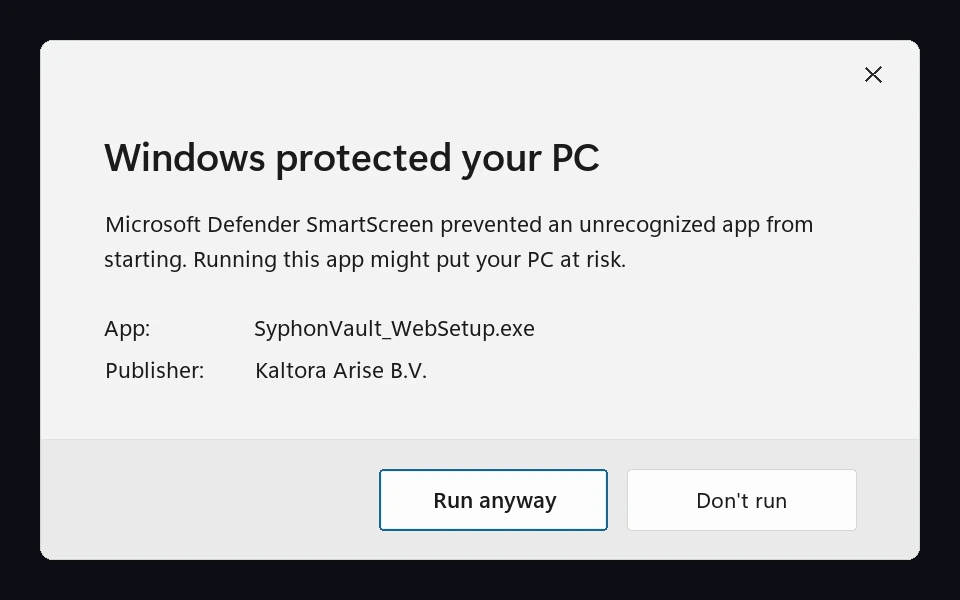
After More info is clicked, Run anyway appears beside Don’t run. Windows may still warn you for a while. The setup is signed by Kaltora Arise B.V., Syphon’s publisher, with a certificate Windows trusts, but Microsoft Defender SmartScreen can show “Windows protected your PC” until enough people have run it. Click More info, then Run anyway. If Windows says Smart App Control blocked it, read why.
Install Gemstone WoW
Open Syphon Vault and press Install on GemstoneWoW. Keep the folder it suggests,
C:\Games\Gemstone-WoW, or press Browse and choose your own. Enhanced graphics is already ticked; leave it on unless your graphics card is an old one.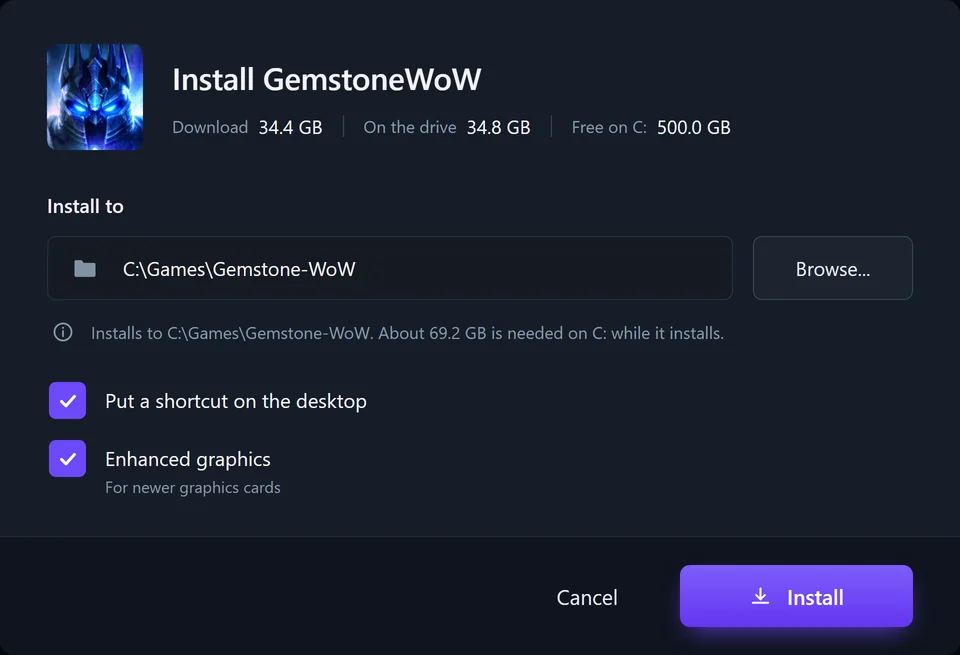
The install window tells you how much room the drive has before you start. The download is 34.4 GB and the installed game takes 34.8 GB. Both sit on the drive while it installs, so keep about 69 GB free. You can pause it and carry on later.
Press Play
When the install is done, GemstoneWoW says Ready to play. Press Play and the game starts straight away: no patcher to wait for, nothing to configure, and the realmlist already set.
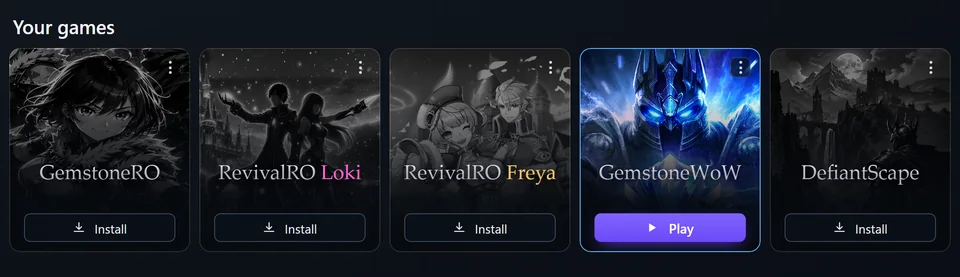
Installed and ready. From here it is one click every time. Log in with your free Gemstone WoW account, roll a character, and you are in. New to the realm? The how to play guide walks you through your first hour.
 The launcher
Everything You Need, In One Launcher
Press Install and Syphon Vault downloads the game, checks every single file against a list signed by Syphon, and puts it where you asked. Press Play and the game opens.
Resume downloads
Pause and carry on whenever you like. A dropped connection, a restart or closing the launcher does not start a 34 GB download over.
Automatic updates
When the game is updated the Vault fetches the changed files and nothing else. It also checks itself for a newer version every time it starts.
File repair
Repair checks every game file and puts back whatever is missing or damaged. Your saved settings stay exactly as you left them.
One-click play
Play starts the game directly. There is no patcher in the way, and the realmlist is already pointed at our realm.
System Requirements
- Operating system
- Windows 10 (version 1903 or newer) or Windows 11
- Launcher
- .NET Framework 4.8, which is part of both
- Storage
- 34.8 GB for the game, about 69 GB free while it installs
- Processor
- Dual-core 2.0 GHz or better
- Memory
- 4 GB RAM
- Graphics
- Any DirectX 9 capable card
- Connection
- Broadband internet
The Classic Experience, Reborn
Wrath of the Lich King 3.3.5a, with the graphics upgrades our client ships with and the realmlist already pointed at our realm. The same Azeroth you remember, looking its best, with nothing for you to set up.
- World of Warcraft 3.3.5a, level cap 80
- Enhanced graphics switched on by default
- The realmlist is set for you — no file editing
- Play starts the game directly, with no patcher step
- A desktop shortcut, if you want one
Download FAQ
The questions players actually ask while the launcher is downloading
No. Syphon Vault is free and works without a Syphon account. To play you only need a free Gemstone WoW account from this website. A Syphon account is only needed for the social features inside the launcher.
Syphon Vault and its setup are signed by Kaltora Arise B.V., Syphon’s publisher, with a certificate Windows trusts, and every game file is checked against a signed list before it is installed. Microsoft Defender SmartScreen can still warn about a new version for a while: click More info, then Run anyway. Antivirus programs sometimes flag private server clients by mistake as well; if yours blocks the game, add the install folder, C:\Games\Gemstone-WoW by default, to its exclusions.
Not for Syphon Vault itself: it installs for your Windows user, and its own updates never ask for permission. Installing a game can ask you once, if it has to put in a Windows component the game needs, such as DirectX 9 or the Visual C++ runtime, and only when your PC does not already have it.
GemstoneWoW is a 34.4 GB download and takes 34.8 GB once it is installed. While it installs, the download and the game are both on your drive, so keep about 69.2 GB free. Syphon Vault shows you how much room the drive has before you press Install.
No. The client Syphon Vault installs is ready to play and the realmlist is already set. If you would rather use a WoW 3.3.5a client you already have, open Data/enUS/realmlist.wtf and set the single line to set realmlist realm.gemstonewow.com.
Yes. Point its realmlist at Gemstone WoW and it will connect. You will miss the graphics upgrades our client ships with, and you will have to keep it up to date yourself, which is what Syphon Vault does for you.
It is the one install choice Syphon Vault offers for GemstoneWoW, and its own description is "For newer graphics cards". It is switched on by default. If your graphics card is older, clear the box before you press Install.
Nothing is lost. The download resumes: pause it and carry on later, and a lost connection, a restart or closing Syphon Vault does not start it over. It picks up where it left off the next time the launcher opens.
No. In My Library, use Locate an installed game and choose the folder it is in. Syphon Vault takes that copy over and can update and repair it from then on.
Open GemstoneWoW in Syphon Vault and use Repair. It checks every game file and puts back whatever is missing or damaged, and your saved settings stay as they are. If that does not fix it, ask in Discord.
Open Windows Settings, then Apps, and uninstall Syphon Vault there. Your games and your settings stay where they are, and the desktop shortcut still starts the game.
No, start the download first. You will need a free account to log in, so it is worth creating one while the game downloads.
Need a Hand?
Players and staff help with installs every day. Bring the exact wording of whatever Windows or the launcher told you and it is usually a one-message fix.